
Registering Headsets
Each headset must be registered to a Basestation before it can be used.
- From the Main Screen, press MODE
- You will be prompted to ‘Enter Your Passcode’.
- Use Passcode 1234 and press MODE again
- The display will show the ‘User Name and ID Number’ (e.g., User1 ID = 1)
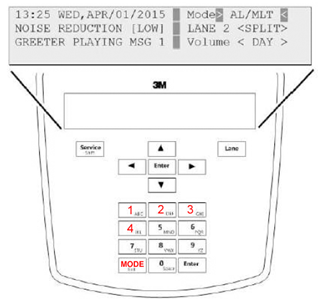
G5 Base Station
- Select: 1>System Menu<
- Using the Arrow Buttons Select 04 > Registration <
- Select 01 > Add New Headsets <
- Power on the headset when prompted on the screen
- Wait up to two minutes for Headset xxxxxxx Has Been Registered to appear at the bottom of the display
- Press MODE to return to Registration Menu
- Repeat for each additional Headset to be added
- Press Mode 3 times when finished to return to the Main Screen